Thursday, November 3, 2016
O+ Christmas Madness Sale (Price and Specs)

The New price list of some O+ Phone for the month of November 2014.
O+ Imagine:Back to Back Scratch Resistant. 32 GB Internal Memory. 5" Full HD Amoled Sceen. 13 MP Back Camera and 5 MP Front Camera. Quad Core.

O+ Imagine Key Specs:
*Android 4.2.1(Jellybean)
*5" FULL HD IPS Capacitive Touch Screen
*Quad Core 1.5GHz Processor
*Dual Camera with 13MP Autofocus and LED Flash Back Camera + 5MP Front Camera
*Bluetooth Connectivity
*Internal Memory 32GB + RAM 2GB
*Singe Micro SIM
*142.7x67.6x7.8mm
*Full HD Video Recording
*2000mAh Li-Po Battery
*GPRS/EDGE, HSDPA (42.2 Mbps)/HSUPA
*Available colors:Black
Price:PHP 12,995.00
O+ 8.16 ANDROID:5.7" HD Quad Core Android

*Android 4.2.1 (Jellybean)
*5.7" HD IPS Capacitive Touch Screen
*Quad Core 1.2 GHz Processor
* Dual Camera with 13MP Autofocus Back Camera + 2MP Front Camera
*Bluetooth Connectivity
*Wi-Fi Connectivity
*Expandable Memory up to 32GB
*Dual SIM
* Over-the-Air Software Updating
* USB on the go
* 2500mAh Battery
* GPRS/EDGE
*162x82.7x8.9mm*Color:Black
Price:PHP 8,995.00

*Android 4.2 (Jelly Bean)
*5" IPS Capacitive Touch Screen
*Air Shuffle Music, Camera, Photos, FM Radio
*1.2 GHz Quad Core processor
*Air Shuffle Music, Camera, Photos, FM Radio
*1.2 GHz Quad Core processor
*Auto Focus 8MP, Dual Camera
*Quad band GSM & Dual Band WCDMA
*Wi-Fi
*3G
*Enjoy MP3
*Up to 32GB expandable memory card
*2000mAh battery
*Quad band GSM & Dual Band WCDMA
*Wi-Fi
*3G
*Enjoy MP3
*Up to 32GB expandable memory card
*2000mAh battery
*Dual SIM / Dual Standby
*Bluetooth 3.0+ HS
*142.5x72.9x8.4mm
*Colors:Black & White
Price:PHP 7,995.00
Price:PHP 7,995.00

O+ 8.92 ANDROID Key Specs:
*Android 4.2.2 (Jellybean)* 5" TFT Capacitive Touch Screen
*Quad Core 1.3 GHz Processor
* Dual Camera with 5MP Autofocus Back Camera + 2MP Front Camera
*3G,Wi-Fi Connectivity
*Bluetooth Connectivity*Expandable Memory up to 32GB
*Dual SIM
* Over-the-Air Software Updating
*Dual SIM
* Over-the-Air Software Updating
*Flip to Silent
*147x75x9.9mm
*1900mAh Battery
*1900mAh Battery
*Color:Black
Price:PHP 5,295.00
O+ 8.91 Android:5inch TFT Capacitive Touch Screen, Dual Core 1.2 GHz Processor.
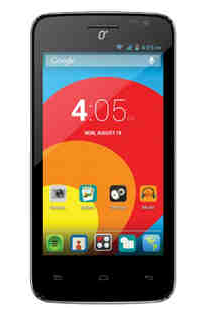
O+ 8.91 Android Key Specs:
*5.0-inch IPS Capacitive Display, 480×854 pixels resolution, 240 dpi
*Dual Camera with 5 Megapixel AF back camera with Flash + 2MP Front Camera
*Dual SIM/Dual Standby
*Dual Core 1.2 GHz processor with Mali-400 MP GPU
*2G/3G
*Quad Band GSM/Dual Band WCDMA
*4GB Internal Memory, expandable up to 32GB microSD card
*512MB RAM
*Wi-Fi, Bluetooth, GPS
*3000 mAh Battery
*Dual Camera with 5 Megapixel AF back camera with Flash + 2MP Front Camera
*Dual SIM/Dual Standby
*Dual Core 1.2 GHz processor with Mali-400 MP GPU
*2G/3G
*Quad Band GSM/Dual Band WCDMA
*4GB Internal Memory, expandable up to 32GB microSD card
*512MB RAM
*Wi-Fi, Bluetooth, GPS
*3000 mAh Battery
Price:PHP 4395.00

O+ 8.52 8GB Key Specs:
*Android 4.1 (Jelly Bean) *4" Capacitive Touch Screen
*1 GHz Dual core processor
*5.0 MP back camera with Autofocus and LED Flash & VGA front
* Up to 32GB expandable memory card
*2G/3G,Wi-Fi connectivity
*Dual SIM / Dual Standby
*Bluetooth 3.0+ HS
* 130x67x10.4mm
*1450mAh Battery
*Color:Black/Pink
*Color:Black/Pink
Price:4,995.00

O+ 8.36Z ANDROID Key Specs:
*Android 4.2(Jellybean)* Dual Core with 1Ghz Processor
* 3.5" Capacitive Touch Screen
*4GB Internal Memory
*3G,Wi-Fi Connectivity
*Dual camera with 3.2MP camera with face detection
*Bluetooth connectivity*Expandable Memory up to 32GB
*Dual SIM
*116.9x62.5x12.6mm
*1500mAh Battery
*Colors:Black/Blue/Pink
Price:PHP 2,595.00
Price:PHP 2,595.00

O+ FAB GO Key Specs:
* Android 4.2.2 (Jellybean)* 6" FWVGA Capacitive Touch Screen
*Dual Core 1.3 GHz Processor
*Dual Camera with 5MP Autofocus Back Camera with Flash+ 2MP Front Camera
*Bluetooth Connectivity
*Dual Camera with 5MP Autofocus Back Camera with Flash+ 2MP Front Camera
*Bluetooth Connectivity
*Expandable Memory up to 32GB
*Dual SIM
*3G, Wi-Fi Connectivity
*Over-the-Air Software Updating
*168 x 90.5 x 9.5mm
*2500mAh Battery
*Color:Black
Price:PHP 5,795.00
*Dual SIM
*3G, Wi-Fi Connectivity
*Over-the-Air Software Updating
*168 x 90.5 x 9.5mm
*2500mAh Battery
*Color:Black
Price:PHP 5,795.00

O+ FAB COLOR 2.0 Key Specs:
*7" screen
*Android OS Jelly Bean
*512MB RAM
*Internal Memory expandable up to 32GB memory card
*Dual Core 1.2GHZ
*Dual camera with 5 megapixel autofoucus back camera
*Wifi
*Dual sim
*Android OS Jelly Bean
*512MB RAM
*Internal Memory expandable up to 32GB memory card
*Dual Core 1.2GHZ
*Dual camera with 5 megapixel autofoucus back camera
*Wifi
*Dual sim
*Color:Black
Price:PHP 4,995.00
Posted by
komon

Wednesday, November 2, 2016
Starmobile Engage 7 Lite Firmware Download Link
Here's How you can fix your Starmobile Engage 7 Lite tablet if you having problem with software related issue like freezes,force close and hang in logo or Android logo only....
MAKE A FULL BACKUP OF YOUR CURRENT ROM. (instructions to follow)
MAKE SURE ROCKCHIP USB DRIVERS INSTALLED.
*download zip from link below
*extract contents then go to extracted folder
*run/execute AndroidTool.exe
*verify check marks. only parameter, misc,kernel,boot,recovery,system and backup should be checked.
----if Engage 7 Lite is ON, connect tab to USB(make sure drivers installed already), press with to reboot into Loader mode.
----if Engage 7 Lite is OFF, hold Volome UP while connecting usb cable. then check AndroidTool, should show "Found RKAndroid Loader"
*if asks for drivers, just locate them in drivers folder
*if already in flash mode(and androidtool detects), press LowerFormat(this wipes nand)
*then press RUN to start flashing. wait for it to finish. this will auto-reboot Engage 7 Lite when done and automatically do factory reset.

*when it boots successfully to home screen, wait for about 5-10mins
*check system>storage and see if phone storage is mounted. if not, format PHONE STORAGE (settings>storage) then reboot. then check if properly mounted.
*(optional) do a factory reset so files/and folders will be properly created on internal storage/phone storage.
*Your Engage 7 Lite should now be fixed.
Download:
Starmobile Engage 7 Lite Firmware and Tools

Posted by
komon
How To Hard Reset Prestigio PMP5580C
How To Hard Reset Prestigio PMP5580C
Please notice that this action will delete all user data from the device.
1. Power OFF the device.
2. Press and hold "VOLUME+" & POWER buttons until the device turns ON.
3. Release buttons and wait till the Recovery menu appears.
4. Use "VOLUME+/-" buttons to navigate through the menu and POWER button to confirm your choice.
5. Select “wipe data/factory reset“ > “delete all user data“.

6. Once the process is complete select “reboot system now“.

7.Follow on screen to continue using tablet


That's It Very Easy!
Something Wrong in my Post?Feel Free to comment Below!
Don't Forget to Like us on Facebook or Subscribe to us via E-mail
Posted by
komon
Tuesday, November 1, 2016
How To Hard Reset Cherry Mobile Bubble With Video
This is How To Hard Reset Cherry Mobile Bubble!Perform a Hard Reset using hardware keys if you forget any phone password and you cannot access settings to manually reset it.
How To Hard Reset Cherry Mobile Bubble
1.Turn-Off Phone
2.Hold and Press Volume Down,Home Button and Power Button
3.Press Volume up to go to Android System Recovery
4.Use Volume Down to select wipe data/factory reset,Power button to confirm
5.Select Yes-delete all user data
6.Reboot System
Here's The Video
That's It Very Easy!
Something Wrong in my Post?Feel Free to comment Below!
Don't Forget to Like us on Facebook or Subscribe to us via E-mail
Posted by
komon
iOS 8 Bugs on iPHONE Factory Unlocking
 |
| iOS 8 |
We have Got Some Reports Regarding Some IMEIs Gets Relocked After Updating To IOS8 Through iTunes Before Applying The Unlock Through Wifi !
And This Is Known Bug In IOS 8 Now !!!
Please Read Below Carefully !
Here Is The Full Story !
** In Case You Submitted Your IMEI While The IPhone Was Still On IOS7 & The IMEI Got Unlocked & Then You Updated The IPhone Through iTunes To IOS8 Before Activating The IPhone Through Wifi ( The IPhone Might Gets Relocked After Updating To IOS8 )
** To Avoid Such Issue You Must Do 1 Of 2 Following Options !
1- Update Your IPhone To IOS8 Before Submitting Your IMEI To US Then After Unlock Done You Can Activate Your IPhone With Any Way ( iTunes Or Wifi ) (Recommended Option) !
2- If You Submitted Your IMEI To Get It Unlocked While The IPhone Was Still On IOS7 Then You Will Have To Activate The IPhone Through Wifi ( Not iTunes ) After Unlocking Your IMEI To Avoid Gets The IPhone Relocked & After Activating & Applying The Unlock You Can Update Your IPhone With iTunes Or Wifi To Latest IOS Version Without Any Issue (Not Recommended Option) !
Posted by
komon
Subscribe to:
Posts (Atom)