Showing posts with label LENOVO. Show all posts
Showing posts with label LENOVO. Show all posts
Wednesday, December 28, 2016
Lenovo A916 Firmware Download Link
Here's the Firmware of Lenovo A916.This firmware is very much working (Tried and Tested many times)..
This firmware which you can use to recover your phone if you have encountered software related problem like hangs,force close,viruses,hang in logo or even boot loop sometimes it will also solve by flashing new firmware using SP Flash Tools.(You can download the firmware and Flash tools below my post).
Procedure:

Download:
Lenovo A916 Firmware
SP Flash Tool v5.1343.1
SP_Flash_Tool_exe_windows_v5
Mediatek USB VCOM drivers
This firmware which you can use to recover your phone if you have encountered software related problem like hangs,force close,viruses,hang in logo or even boot loop sometimes it will also solve by flashing new firmware using SP Flash Tools.(You can download the firmware and Flash tools below my post).
Procedure:
1.Download and extract the SP Flash Tool and Mediatek USB VCOM drivers.Install the driver if not already installed
2.Download and extract your ROM package and find the scatter.txt file.
3.Run Flash_tool.exe then click Scatter-loading button to load the correct scatter file
4.Turn off your phone, remove the battery and replace it after some seconds (and don't turn on the phone).
5. Press F9 (or hit Download button) and connect your phone into the computer via USB data cable. The process will start and a red progress bar will appear.
6.After the red progress bar is complete, there will appear a purple progress bar.Right after the purple progress bar is complete, a message will appear underneath it:
7.“Please insert USB cable in x seconds” and then the download will start right away (you will see the yellow progress bar filling up).
8.When the yellow bar is complete, you'll get a popup with a green circle and Download OK message, which means that the process has been successfully terminated.
9.You can now safely disconnect your phone and turn it on. The process ends here.

Download:
Lenovo A916 Firmware
SP Flash Tool v5.1343.1
SP_Flash_Tool_exe_windows_v5
Mediatek USB VCOM drivers
Posted by
komon

Sunday, December 25, 2016
How To Hard Reset Lenovo S720
This tutorial will guide you the steps that you should follow to perform a Hard reset in your Lenovo S720.A hard reset restores the original factory settings and may delete your personal data on the internal storage, such as downloaded content, ringtones, images, apps, and contacts. It does not delete data stored on the SIM card or SD card.
This will fix the following problems you may encounter in your Lenovo S720.We listed below some of these cases and errors:
* After installing bad or unsupported application into yourLenovo S720, Which causes your phone to be frozen.
* Your Lenovo S720 doesn't respond to any order after booting because of any software errors.
* Forgotten pattern lock.
* Forgotten user code.
* Forgotten phone code.
*Getting Rid of Force Close errors.
* Fixing the Boot loop situation.
* Before or after installing a new firmware update into your device.
* Before selling the device, To Wipe all your saved personal data.
There are Two method to perform a Hard Reset using hardware keys,find Out below!
First method:
1. Power off
2. Press Camera button (keep pressing) then press Power button.
-> This will bring the phone to "Meta Mode"
3. Wait 5 seconds until "Factory Mode" menu appears.
-> If factory mode doesn't appear, press volume up/down button.
4. Select "Clear eMMC". Use Volume +/- to move up or down in the menu.
-> Use Back soft button to go back to previous selection.
5. Press Home soft button to initiate hard/factory reset.
-> Phone will reboot automatically after a successful reset.
Second Method:
1.Make sure battery is fully charge and Turn-Off Phone
2.Hold and Press Volume Up together
3.When in Android System Recovery use Volume down to select wipe data/factory reset,use power button or volume up to confirm
4.Select Yes-delete all user data,again confirm
5.After finish wipe,Reboot System
6.Wait until completely power on
That's It Very Easy!
Something Wrong in my Post?Feel Free to comment Below!
Don't Forget to Like us on Facebook or Subscribe to us via E-mail
This will fix the following problems you may encounter in your Lenovo S720.We listed below some of these cases and errors:
* After installing bad or unsupported application into yourLenovo S720, Which causes your phone to be frozen.
* Your Lenovo S720 doesn't respond to any order after booting because of any software errors.
* Forgotten pattern lock.
* Forgotten user code.
* Forgotten phone code.
*Getting Rid of Force Close errors.
* Fixing the Boot loop situation.
* Before or after installing a new firmware update into your device.
* Before selling the device, To Wipe all your saved personal data.
There are Two method to perform a Hard Reset using hardware keys,find Out below!
 |
| Lenovo S720 |
1. Power off
2. Press Camera button (keep pressing) then press Power button.
-> This will bring the phone to "Meta Mode"
3. Wait 5 seconds until "Factory Mode" menu appears.
-> If factory mode doesn't appear, press volume up/down button.
4. Select "Clear eMMC". Use Volume +/- to move up or down in the menu.
-> Use Back soft button to go back to previous selection.
5. Press Home soft button to initiate hard/factory reset.
-> Phone will reboot automatically after a successful reset.
Second Method:
1.Make sure battery is fully charge and Turn-Off Phone
2.Hold and Press Volume Up together
3.When in Android System Recovery use Volume down to select wipe data/factory reset,use power button or volume up to confirm
4.Select Yes-delete all user data,again confirm
5.After finish wipe,Reboot System
6.Wait until completely power on
That's It Very Easy!
Something Wrong in my Post?Feel Free to comment Below!
Don't Forget to Like us on Facebook or Subscribe to us via E-mail
Posted by
komon
Wednesday, December 7, 2016
How To Hard Reset Lenovo B6000-F Using Hardware Keys
This tutorial will guide you the steps that you should follow to perform a hard reset using hardware keys on your Lenovo B6000-F.The hard reset operation is an easy operation, And you can do it yourself to fix many software problems on your Lenovo B6000-F.First thing first let's take a look the specifications of this tablet.
The IdeadPad B6000-F features an 8 inch 1280 x 800 pixel display, a quad core Mediatek 1.2 GHz CPU, 1 GB of RAM, 16 GB of storage, Android 4.2 and a 5 MP back camera. There’s a 6000 mAh battery inside.
 |
| Lenovo B6000-F |
Lenovo B6000-F Specs:
MediaTek MT8125 quad-core processor at 1.2 GHz
8-inch WXGA display with a resolution of 1,280 x 800 pixels
1 GB of RAM
16 GB internal memory
Android 4.2 Jelly Bean
5 megapixel cam on the back
6000 mAh battery for up to 16 hours
As we mentioned above and since this phone is MTK chips there should be a hard reset.You can Hard Reset your Lenovo B6000-F to fix many errors and in other cases too, We listed below some of these cases and errors:
* After installing bad or unsupported application into your Lenovo B6000-F, Which causes your phone to be frozen.
* Your Lenovo B6000-F doesn't respond to any order after booting because of any software errors.
* Forgotten pattern lock.
* Forgotten user code.
* Forgotten phone code.
*Getting Rid of Force Close errors.
* Fixing the Boot loop situation.
* Before or after installing a new firmware update into your device.
* Before selling the device, To Wipe all your saved personal data.
Lenovo B6000-F Hard Reset Steps:
1.Make sure the battery is fully charge at turn-off tablet2.Hold and Press Volume up and down and Power button together
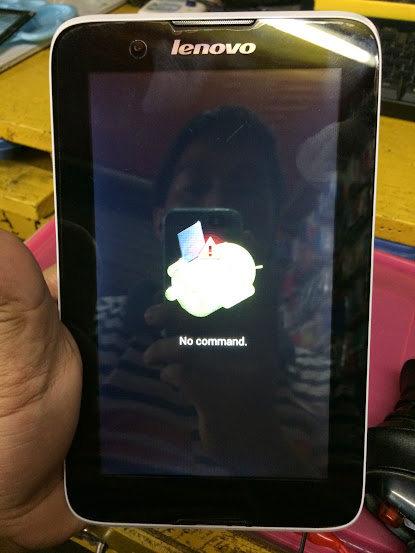
3.When you no command press power button to go to Android System Recovery
4.Use Volume down to select wipe data/factory reset,Power button to confirm
5.Select Yes-delete all user data,again confirm it by pressing power button.
6.After Finish wipe,Reboot system and wait until completely power on.
That's It Very Easy!
Something Wrong in my Post?Feel Free to comment Below!
Don't Forget to Like us on Facebook or Subscribe to us via E-mail
Posted by
komon
How To Hard Reset Lenovo A316i Using Hardware Keys
Hello!I want to share this tutorial that you should follow to perform a hard reset using hardware keys on your Lenovo A316i.The hard reset operation is an easy operation, And you can do it yourself to fix many software problems on your Lenovo A316i.First thing first let's take a look the specifications of this phone.
 |
| Lenovo A316i |
Lenovo A316i Specs
Android 4.2 Jelly Bean4-inch capacitive touchscreen (480×800 WVGA), ~233ppi
1.3GHz dual core MediaTek MT6572 processor
Mali-400 MP1 GPU
512MB RAM
4GB internal storage
microSD support up to 32GB
2-megapixel main camera, with fixed focus
No front camera
Wi-Fi 802.11 b/g/n
3G HSPA+, WCDMA 900/2100MHz
2G GSM 900/1800/1900MHz
Bluetooth 3.0 HS
GPS, A-GPS
Dimensions: 117 x 63.5 x 12.2mm
Weight: 121g
Li-Ion 1300mAh battery
As we mentioned above and since this phone is MTK chips there should be a hard reset.You can Hard Reset your Lenovo A316i to fix many errors and in other cases too, We listed below some of these cases and errors:
* After installing bad or unsupported application into your Lenovo A316i, Which causes your phone to be frozen.
* Your Lenovo A316i doesn't respond to any order after booting because of any software errors.
* Forgotten pattern lock.
* Forgotten user code.
* Forgotten phone code.
*Getting Rid of Force Close errors.
* Fixing the Boot loop situation.
* Before or after installing a new firmware update into your device.
* Before selling the device, To Wipe all your saved personal data.
Lenovo A316i Hard Reset Steps:

1.Make sure battery is fully charge and Turn-Off Phone
2.Hold and Press Volume Up together
3.When in Android System Recovery use Volume down to select wipe data/factory reset,use power button or volume up to confirm
4.Select Yes-delete all user data,again confirm
5.After finish wipe,Reboot System
6.Wait until completely power on
That's It Very Easy!
Something Wrong in my Post?Feel Free to comment Below!
Don't Forget to Like us on Facebook or Subscribe to us via E-mail
Posted by
komon
Monday, December 5, 2016
Lenovo A850 Firmware Download Link
Here's the Firmware of Lenovo A850 which you can use to recover your smartphone if you have experienced phone freezes,hangs,hang in logo or hang in Android Logo,Force close and Boot Loops.
1. Open SP FLASH TOOL
2. Browse SCATTER FILE
3. SET DOWNLOAD ONLY
4. Click DOWNLOAD
5. Connect your Phone to Computer using USB Cable
Here's How To Flash Firmware Using SP Flash Tools
1. Open SP FLASH TOOL
2. Browse SCATTER FILE
3. SET DOWNLOAD ONLY
4. Click DOWNLOAD
5. Connect your Phone to Computer using USB Cable
6.Wait Until Completely Finish Flashing (As shown in the image)

DOwnload:
Lenovo A850 Firmware
Credits:hmanogangcar
DOwnload:
Lenovo A850 Firmware
Credits:hmanogangcar
Posted by
komon
Friday, December 2, 2016
Lenovo A319 Specifications,Features And Price
Aside from Lenovo S580,Lenovo also launches Lenovo A319-A compact smartphone made for music lovers.the Lenovo A319 price at PHP 3,999.00 only.
In addition, music lovers are in for a treat as the A319 comes with a pre-installed award-winning music service, Guvera. Users can discover new music and play the best tracks from around the globe for free. The pre-loaded app’s unique Play feature, lets users use hashtags to find music that suit their mood. The A319 comes in three color variants: black, red, and white.
 |
| Lenovo A319 |
Lenovo A319 Specifications:
Dual SIM / Dual Standby
1.3GHz dual-core Mediatek MT6572 processor
4-inch WVGA (800x480) wide-view display, 233ppi
Android 4.4.2 (KitKat)
Mali-400 GPU
512MB of RAM
4GB of internal storage
microSD support up to 32GB
5MP fixed-focus camera with LED flash
2MP fixed-focus front-facing camera
Dolby Digital Plus audio
GPS with A-GPS support
Wi-Fi 802.11 b/g/n / Wi-Fi Hotspot
HSPA+ 21Mbps (DL) / 5.76Mbps (UL)
FM radio with 3.5mm audio jack
Bluetooth 4.0
microUSB 2.0
Li-Ion 1,500mAh battery (removable)
123.5 x 63.8 x 10.2mm (dimension)
130g (weight)
Price:
PHP 3,999.00 Suggested Retail Price
Posted by
komon
Lenovo S580 Specifications,Feature and Price
Lenovo launches it's newest affordable smartphone,The Lenovo S850-tag by the company as HD entertainment in a compact, ultra-stylish smartphone for only PHP 8,999.00.
The Lenovo S580 is powered by Android OS Jelly Bean 4.3,not to mention for photography fans-the device has a 8MP auto-focus rear camera with flash and 2MP front facing camera.
The Lenovo S580 also packs the exclusive Lenovo DOit apps -- ShareIt, SyncIt, SecureIt. With these pre-installed apps, quick file sharing, syncing files to the cloud and protection from viruses and malware have never been easier.
The Lenovo S580 also support Dual Regular SIM, Dual Standby,HSPA+ Technology 42Mbps(DL) / 5.76Mbps(UL),Wi-Fi 802.11 b/g/n / Wi-Fi Hotspot and Bluetooth 3.0 HS connectivity.The device have a pre-installed games like Asphalt 8, Gamestore, Green Farm 3, Real Football 2014 & Spider-Man: Ultimate Power.
 |
| Lenovo S580 |
Lenovo S850 Specifications:
5.0" HD (1280x720) IPS display
Qualcomm® Snapdragon™ 200 MSM8212 1.2GHz Quad Core Processor
1GB RAM / 8GB ROM / 32GB expandable
8MP auto-focus rear camera w/ flash;
Qualcomm® Snapdragon™ 200 MSM8212 1.2GHz Quad Core Processor
1GB RAM / 8GB ROM / 32GB expandable
8MP auto-focus rear camera w/ flash;
2MP front camera
HSPA+ Technology 42Mbps(DL) / 5.76Mbps(UL)
Dual Regular SIM, Dual Standby
Android OS Jelly Bean 4.3
HSPA+ Technology 42Mbps(DL) / 5.76Mbps(UL)
Dual Regular SIM, Dual Standby
Android OS Jelly Bean 4.3
GPS with A-GPS support
FM radio with 3.5mm audio jack
Bluetooth 3.0 HS
microUSB 2.0
Wi-Fi 802.11 b/g/n / Wi-Fi Hotspot
HSPA+ 21Mbps (DL) / 5.76Mbps (UL)
Li-Pol 2,000mAh battery (non-removable)
141 x 71 x 8.2mm (dimension)
140g (weight)
Price:
PHP 8,999.00 Suggested Retail Price
Posted by
komon
Monday, November 28, 2016
Lenovo A369i Firmware Download Link
Here's the Firmware of Lenovo A369i which you can use to recover your smartphone if you have experienced phone freezes,hangs,hang in logo or hang in Android Logo,Force close and Boot Loops.
1. Open SP FLASH TOOL
2. Browse SCATTER FILE
3. SET DOWNLOAD ONLY
4. Click DOWNLOAD
5. Connect your Phone to Computer using USB Cable
Download:
Lenovo A369i Firmware
Here's How To Flash Firmware Using SP Flash Tools
1. Open SP FLASH TOOL
2. Browse SCATTER FILE
3. SET DOWNLOAD ONLY
4. Click DOWNLOAD
5. Connect your Phone to Computer using USB Cable
6.Wait Until Completely Finish Flashing (As shown in the image)
Download:
Lenovo A369i Firmware
Posted by
komon
Sunday, November 6, 2016
Lenovo VIBE X2 Announced:Priced at PHP 18,999.00

Becoming a PC Plus leader with a focus on smartphone is the most crucial challenge for Lenovo. We are well positioned to succeed as we have the innovation and in-house manufacturing capability to bring new and exciting products to the market quickly and efficiently,said Michael Ngan, Country General Manager, Lenovo Philippines.
The Lenovo VIBE X2 is equipped with the latest MediaTek MT6595 True Octa-core processor with 4G LTE.5-inch full HD display, 13MP camera and a layered design which sets it apart from other smartphones.
Here's The Lenovo VIBE X2:
Here's The Lenovo VIBE X2:

The Lenovo VIBE X2 is powered by latest Android 4.4 Kitkat with Lenovo’s Vibe UI 2.0 on top.2GB of RAM plus 32GB Internal storage with no Micro SD slot and Dual SIM (Micro) and a battery of 2,300mAh Li-Po that isn't removable.
Lenovo Vibe X2 Specifications (Philippine Version)
Android 4.4 Kitkat OS with VIBE UI 2.0
2.0GHz Octa Core MediaTek MT6595m True8Core™ Processor
5.0-Inch FHD IPS Display (1080 x 1920 Pixels, 441 ppi)
PowerVR G600 GPU
13.0 Megapixel Autofocus Main Camera with LED Flash
5.0 Megapixel Wide Angle Front Camera
2GB of RAM
32GB Internal Storage
No MicroSD Slot
Dual SIM (Micro)
4G LTE, 3G HSPA+, 2G EDGE and GPRS Networks
Dual Band Wi-Fi and Wi-Fi Hotspot
Bluetooth 4.0
GPS with A-GPS and GLONASS
FM Radio
MicroUSB
3.5mm Audio Jack
Magnetometer
Gyroscope
Accelerometer
Proximity Sensor
Light Sensor
Compatible with Xtensions™
Gesture Control
Noise Cancellation
140.2 x 68.6 x 7.3 mm @ 120 grams
2,300mAh Li-Po Battery (Non-removable)
2.0GHz Octa Core MediaTek MT6595m True8Core™ Processor
5.0-Inch FHD IPS Display (1080 x 1920 Pixels, 441 ppi)
PowerVR G600 GPU
13.0 Megapixel Autofocus Main Camera with LED Flash
5.0 Megapixel Wide Angle Front Camera
2GB of RAM
32GB Internal Storage
No MicroSD Slot
Dual SIM (Micro)
4G LTE, 3G HSPA+, 2G EDGE and GPRS Networks
Dual Band Wi-Fi and Wi-Fi Hotspot
Bluetooth 4.0
GPS with A-GPS and GLONASS
FM Radio
MicroUSB
3.5mm Audio Jack
Magnetometer
Gyroscope
Accelerometer
Proximity Sensor
Light Sensor
Compatible with Xtensions™
Gesture Control
Noise Cancellation
140.2 x 68.6 x 7.3 mm @ 120 grams
2,300mAh Li-Po Battery (Non-removable)
PRICE:
PHP 18,999 Suggested retail price
Posted by
komon
How To Unlock Lenovo A516 using Sigma Box
This is How To Unlock Lenovo A516 using Sigma Box.Unlock it using META MODE,Must have a PC,Micro USB Cable and Sigma Box Software.
Here's What to do:
1.Connect Phone to PC using META Mode (Press Volume Down and Power Button)
2.Install CDC Driver Lenovo A516


Read more »
Here's What to do:
1.Connect Phone to PC using META Mode (Press Volume Down and Power Button)
2.Install CDC Driver Lenovo A516
3.Open Sigma and select MTK in flatform
4.Select Lenovo USB VCOM (Android) in serial port
5.Click Unlock and wait until finish unlocking
Here's The Lenovo A516 Unlocked
That's It Very Easy!
Something Wrong in my Post?Feel Free to comment Below!
Don't Forget to Like us on Facebook or Subscribe to us via E-mail
Posted by
komon
Sunday, October 30, 2016
Motorola is now a Lenovo Company

Yes!It's done deal according to Motorola and Lenovo,Motorola is now a part Lenovo Company!
Rick Osterloh, President of Motorola, rightly points out what the company aims to do:
We will continue to focus on pure Android and fast upgrades, and remain committed to developing technology to solve real consumer problems.
That's make Lenovo number 3 in the worlds smartphone maker,according to YANG Yuanqing,Chairman and CEO of Lenovo,
By building a strong number 3 and a credible challenger to the top two in smartphones,we will give the market something it has needed-choice,competition and a new spark of innovation.
Posted by
komon
Thursday, October 13, 2016
Lenovo Launches Lenovo Vibe Z2 Pro:A Pro Photography Enthusiast Smartphone

Leave your old camera in the dust with the class-leading Lenovo VIBE Z2 Pro, a maximum performance smartphone with pro photography features
The Lenovo Vibe Z2 Pro sports a 6-inch (2560 x 1440 pixels) Quad HD IPS display and is powered by Qualcomm® Snapdragon™ MSM8974AC 2.5GHz quad-core processor with 550 MHz Adreno 330 GPU. The CPU is also backed by 3GB of RAM and the handset runs on Android 4.4 (KitKat) with Vibe 2.0 UI layered on top.
Lenovo Vibe Z2 features don't stop there as everyone seems to be raving about its long battery life. The phone sports a 4,000mAh which boasts to last an estimated 45 hours of talk time and 39 days when placed on standby mode.

Lenovo Vibe Z2 Pro Specifications
Dual Micro SIM, Dual StandbyQualcomm® Snapdragon™ 801 MSM8974AC 2.5GHz Quad-Core Processor + Adreno 330 550Mhz GPU
Android OS KitKat 4.4.2 w/Dual OS (Lenovo & Stock Android, switch via Developer Options)
6" Quad-HD (2KHD) 2560x1440 IPS, 10pts Multi-Touch w/490 Ppi
LTE CAT4 150Mbps (DL), 51Mbps (UL), HSPA+ 21Mbps (DL), 5.76Mbps (UL)
3GB RAM, 32GB ROM (25GB User Memory)
16MP AF w/Dual Flash, OIS, 16:9 BSI/RGB Sensor Rear + 5MP FF w/RGB Sensor Front Cameras
Ultra HD (4K) w/Best Live, Fast/Slow Motion Video Recording, Smart Scene Recognition, Timer, Voice & Smile Shot, GPS Location Info, Panorama & Color Effects, Switch to Professional Camera, HDR, Art Nightscape, Artistic HDR, Trajectory & Face Beauty Effects
Feature Settings: 3D Gestures, Micro Screen, Shake Lock, Smart Dialer, Wide Touch, Pocket Mode & Decrease tone volume
Increased volume, better bass, sealed sound chamber & earphone amplifier
SNS: Facebook, Skype & Twitter
DOit Apps: SHAREit, SYNCit, Security, SNAPit & SEEit
Games: Asphalt 8, Gamestore, Green Farm 3, Real Football 2014 & Spider-Man: Ultimate Power
Browsers: Chrome & UC Browser
G-Apps: Gmail, Google+, Maps, YouTube, Play Music & Play Store, Play Books, Play Games & Play Newsstand & Drive
Utilities: Evernote, Scoop, Navigate, Driving App, Power Manager, Kingsoft Office, One Key Lock & Guvera
Connectivity: Micro USB, Bluetooth 4.0, Wi-Fi 802.11 b/g/n/ac, Personal Hotspot, GPS with AGPS support, Wireless Display, NFC & OTG
Sensors: E-Compass, Gravitational, Proximity & Light Sensor
Standby time: 39.5days (2G/3G/4G)
Talk time: up to 45hours (2G/3G/4G)
Posted by
komon
Tuesday, October 11, 2016
Lenovo Yoga 3 Pro Specifications,Price And Availability
The world's thinnest convertible notebook
 |
| Lenovo Yoga 3 Pro |
A NEW WAY TO BINGE WATCH
The enhanced entertainment features of the YOGA 3 Pro make whatever you’re watching enjoyable in every way
QHD+ TOUCHSCREEN DISPLAY
Super high-resolution (3200x1800) wide-view display with touchscreen
Super high-resolution (3200x1800) wide-view display with touchscreen
INTELLIGENT AUDIO
JBL® speakers and Maxx Technologies by Waves Audio dynamically adjust to optimise sound every way you use the device
JBL® speakers and Maxx Technologies by Waves Audio dynamically adjust to optimise sound every way you use the device
WORLD’S THINNEST CONVERTIBLE LAPTOP
Ultra thin and light at 1.19kg and 12.88mm thick

Lenovo Yoga 3 Pro Specifications
Intel® Core™ M-70 processor13.3-inch QHD+ (3200x1800) IPS display, 276ppi
Microsoft Windows 8.1 OS
6-hinge watchband designIntel integrated graphics
8GB LPDDR3L RAM
512GB SSD
720p webcam
WiFi 802.11 a/c / Bluetooth 4.0
2x USB 3.0 / 1x DC-in with USB 2.0 function / 4-in-1 card reader / micro-HDMI out / Audio combo jack Integrated KBL stereo speakers w/ Waves Audio 330 x 228 x 12.8mm (dimension)
Battery life Up to 9 hours
300 x 228 x 12.8mm 1.19kg (size & weight)
Pricing and Availability
The Lenovo Yoga 3 Pro starts at $1,349 (around Php 60,300) and will be available in partner stores at the end of October.
Posted by
komon
Lenovo Unveils Android and Windows powered Yoga Tablet 2 Pro and Yoga Tablet 2
Lenovo Unveils Android and Windows powered Yoga Tablet 2 Pro and Yoga Tablet 2
 Chinese PC maker and world's largest manufacturer of personal computers, Lenovo Group, yesterday showed off two new tablets running on Google's Android and Microsoft's Windows operating systems, the Yoga Tablet 2 Pro and Yoga Tablet 2. The other one, the Yoga Tablet 2 Pro comes with an internal projector, which Lenovo calls the ''pico-projector'', that can beam an image up to 50 inches on a surface.
The Tablet 2 Pro is an Android tablet that has a 13-inch QHD diplay and is powered by a quad-core Intel Atom Z3745 proccessor with a 2GB RAM. It offers an 8 megapixel rear camera and a 1.6 megapixel front facing camera and has a 32GB internal storage expanded to 64GB with a microSD card. It supports WiFi, Bluetooth 4.0 and 4G LTE.

Lenovo revealed that the Yoga Tablet 2 Pro will be available later this month, and will cost $499.
As for the Yoga Tablet 2, it comes in two models of four. That is, an 8-inch and 10-inch models running on Android as well as an 8-inch and 10-inch models running Windows 8. Don't get confuse here. Both models pack the same specs except for their price and operating systems.

The ones running Android will sell for $250 and $300 while the ones running Windows will be priced higher at $300 and $400 respectively. The Windows tablets will hit stores in November.
Lenovo Yoga Tablet 2 Specifications
Android 4.4 (KitKat) / Windows 8.1 OS
Intel Atom Processor Z3745 (2M cache, 4 cores, up to 1.86GHz)
10.1-inch Full HD IPS display, 218ppi
8-inch Full HD IPS display, 275ppi
2GB of LP-DDR3 RAM
16GB internal storage (Android)
32GB internal storage (Windows)
microSD support up to 64GB
8MP f2.2 AF rear camera
1.6MP front-facing camera
WiFi 802.11 b/g/n dual-band
optional 4G LTE (in select countries)
Bluetooth 4.0 / microUSB OTG
Dolby Audio / Wolfson Master Hi-Fi
18 hours battery life (Android)
15 hours battery life (Windows)
Lenovo Yoga Tablet 2 Pro Specifications
Android 4.4 (KitKat)
13.3-inch Quad HD (2560x1440) IPS display, 221ppiIntel Atom Processor Z3745 (2M cache, 4 cores, up to 1.86GHz)
2GB of RAM
32GB of internal storage
microSD support up to 64GB
8MP f2.2 AF rear camera
1.6MP front-facing camera
WiFi 802.11 b/g/n dual-band
Built-in Pico Projector, 40-50 Lumens, WVGA (854x480) resolution
4G LTE with phone call functionality (select countries in Asia)
1.5W speakers (2x), 5W JBL subwoofer
Dolby Audio, Wolfson Master Hi-Fi
Bluetooth 4.0 / microUSB OTG
Li-Ion 9,600mAh battery (non-removable)
333 x 223 x 3.7-12.6mm (dimension)
950g (weight)
Posted by
komon
Wednesday, September 28, 2016
Lenovo Thinkpad X1 Carbon (2014) Specifications And Price
PROFESSIONAL REDEFINED.
New 14" ThinkPad X1 Carbon starts at just 2.83 lbs, yet it's durable with carbon-fiber construction and packed with premium features like an Adaptive Keyboard that changes automatically with apps, RapidCharge battery technology, a patented cooling system, and a stunning ThinkPad ColorBurst Display.
Read more »
New 14" ThinkPad X1 Carbon starts at just 2.83 lbs, yet it's durable with carbon-fiber construction and packed with premium features like an Adaptive Keyboard that changes automatically with apps, RapidCharge battery technology, a patented cooling system, and a stunning ThinkPad ColorBurst Display.
Available With 10-Point Multitouch Screen
10-point multitouch screen improves accuracy, making touch-browsing and selecting more responsive and precise.
10-point multitouch screen improves accuracy, making touch-browsing and selecting more responsive and precise.
Uncommonly Intuitive Adaptive Keyboard
The unique Adaptive Keyboard automatically changes the row of function keys depending on what application you're in. Less clutter, more function, and a streamlined keyboard that anticipates your needs.
The unique Adaptive Keyboard automatically changes the row of function keys depending on what application you're in. Less clutter, more function, and a streamlined keyboard that anticipates your needs.
Stunning Display
ThinkPad ColorBurst Display (WQHD, 2560 x 1440) and antiglare screen mean text is crisper, images are brighter, and colors are truer. 300 nit with IPS for nearly 180-degrees of wide-screen viewing. Plus it's anti-smudge. Also available with HD+ (1600 x 900) display.
ThinkPad ColorBurst Display (WQHD, 2560 x 1440) and antiglare screen mean text is crisper, images are brighter, and colors are truer. 300 nit with IPS for nearly 180-degrees of wide-screen viewing. Plus it's anti-smudge. Also available with HD+ (1600 x 900) display.
Practically Indestructible: Tested to Military Specifications
Constructed with satellite-grade carbon fiber, X1 Carbon is the toughest ThinkPad ever made. In fact, we perform eight separate military specification tests—all under extreme conditions with dust, vibration, heat, cold, altitude, water, and humidity—so you can laugh in the face of spills, drops, heat exposure, or anything else life throws your way.
Constructed with satellite-grade carbon fiber, X1 Carbon is the toughest ThinkPad ever made. In fact, we perform eight separate military specification tests—all under extreme conditions with dust, vibration, heat, cold, altitude, water, and humidity—so you can laugh in the face of spills, drops, heat exposure, or anything else life throws your way.
Business-Class Security
Available with fingerprint reader, X1 Carbon lets you use biometrics for login, so the swipe of your finger becomes your password. Intel® security features and vPro options step up protection and enhance manageability when deploying upgrades. The Trusted Platform Module (TPM) chip further encrypts your critical information.
Available with fingerprint reader, X1 Carbon lets you use biometrics for login, so the swipe of your finger becomes your password. Intel® security features and vPro options step up protection and enhance manageability when deploying upgrades. The Trusted Platform Module (TPM) chip further encrypts your critical information.
Patently Cool: Revolutionary New Thermal Technology
Even with its ultrathin design, the new X1 Carbon stays cooler than ever. In fact, we re-engineered our patented fan blades—so X1 Carbon provides the same cool and quiet performance you expect from a ThinkPad.
Even with its ultrathin design, the new X1 Carbon stays cooler than ever. In fact, we re-engineered our patented fan blades—so X1 Carbon provides the same cool and quiet performance you expect from a ThinkPad.
Uncompromisingly Thin
Starting at just 1.28 kg, the new X1 Carbon is the lightest 14" Ultrabook™ on the planet. And at just 17.72 mm thin, it's the thinnest ThinkPad ever.
Starting at just 1.28 kg, the new X1 Carbon is the lightest 14" Ultrabook™ on the planet. And at just 17.72 mm thin, it's the thinnest ThinkPad ever.
Longer Battery Life
The new X1 Carbon delivers up to 9 hours of battery life on a single charge. And if you do run low, don't fret: with RapidCharge you get 80% battery restored in just under an hour.

The new X1 Carbon delivers up to 9 hours of battery life on a single charge. And if you do run low, don't fret: with RapidCharge you get 80% battery restored in just under an hour.
Lenovo Thinkpad X1 Carbon (2014) specs:
Intel® Core™ i7-4550U | i7-4600U Processor or
Intel Core i5-4300U | i5-4200U Processor
Intel Core i5-4300U | i5-4200U Processor
14-inch HD+(1600×900) 260nit, TN LED display or
14-inch WQHD IPS touchscreen display
Intel HD Graphics 4400 with 4GB DDR3 RAM or
Intel® HD Graphics 5000 with 8GB DDR3 RAM
Up to 512GB SSD
1.3MP – 720P webcam
5-row with Trackpoint plus Adaptive backlit Keyboard
2 x USB 3.0 (1 with AOU)
Audio/Mic Combo OneLink Dock
HDMI, MiniDP
NFC
Intel Centrino 7260 or Centrino 7260BN
Native RJ45 using Ethernet Connector or USB emulation
Bluetooth 4.0 supported by WLAN module
TrackPoint and 5 Button trackpad with Glass surface
Dolby Home Theater v4
up to 8.6 hours battery life
Windows 8.1 Pro
17.72mm thin
1.28 kg (weight)
14-inch WQHD IPS touchscreen display
Intel HD Graphics 4400 with 4GB DDR3 RAM or
Intel® HD Graphics 5000 with 8GB DDR3 RAM
Up to 512GB SSD
1.3MP – 720P webcam
5-row with Trackpoint plus Adaptive backlit Keyboard
2 x USB 3.0 (1 with AOU)
Audio/Mic Combo OneLink Dock
HDMI, MiniDP
NFC
Intel Centrino 7260 or Centrino 7260BN
Native RJ45 using Ethernet Connector or USB emulation
Bluetooth 4.0 supported by WLAN module
TrackPoint and 5 Button trackpad with Glass surface
Dolby Home Theater v4
up to 8.6 hours battery life
Windows 8.1 Pro
17.72mm thin
1.28 kg (weight)
You can Have this Start at 105k PHP
Posted by
komon
Friday, September 23, 2016
Lenovo ThinkPad 8 Specifications And Price

BUSINESS TABLET WITH FULL PC EXPERIENCE.
This 8.3" multimode tablet features the best offerings from Lenovo, Microsoft, and Intel combined into one productive, mobile, secure device with faster graphics and three modes: Tablet, Desktop, and Tent.
Lenovo ThinkPad 8 Specifications
8.3-inch IPS LCD screen, 1920×1200 @273ppi
2.4GHz Intel Atom Z3770 quad-core processor
Intel HD Graphics Gen7
2GB LPDDR3-1067 RAM
Expandable 32 / 64 / 128GB internal storage
Supports up to 128GB micro-SD card
8MP rear camera with LED flash
1080p video recording
2MP front-mounted camera
Optional 4G/LTE (WWAN models only), Micro-SIM
Wi-Fi 802.11 a/b/g/n, Wireless Display (WiDi) support
1x USB 3.0, 1x mHDMI 1.4a
GPS w/ A-GPS
132mm x 224.3mm x 8.8mm (dimensions)
430g (weight)
Price:
Official Suggested Retail Price At 25,490 Pesos
Availability
Now Available on Lenovo Concept Stores Nationwide
Posted by
komon
Tuesday, September 20, 2016
Lenovo A536 Specifications,Price And How To Hard Reset Using Hardware Keys

Lenovo has officially launched in Philippines its latest and newest smartphone known as the Lenovo A536, which amazingly built with fabulous specs and features that can absolutely attract some consumers.
Lenovo A536 is now available on its concept stores with the price tag of Php6,499.
Lenovo A536 Specifications
Android 4.4 KitKat
5-inch FWVGA display
1.3GHz quad-core MT6582M processor
1GB of RAM
8GB of storage, expandable via microSD
5-megapixel rear camera with flash
2-megapixel front camera
Dual-SIM
3G
WiFi, Bluetooth, GPS
2000 MAh Battery
1.3GHz quad-core MT6582M processor
1GB of RAM
8GB of storage, expandable via microSD
5-megapixel rear camera with flash
2-megapixel front camera
Dual-SIM
3G
WiFi, Bluetooth, GPS
2000 MAh Battery
How To Hard Reset Using Hardware Keys
Warning! After this reset, all personal data from phone will be lost, so make a backup before.
1.Power off your phone (Recommended Directly Remove battery and Put it Back)
2.Hold and Press together volume up and power button
3.When you see Android lying with Exclamation Point,Click Power button to go to Android System Recovery
1.Power off your phone (Recommended Directly Remove battery and Put it Back)
2.Hold and Press together volume up and power button
3.When you see Android lying with Exclamation Point,Click Power button to go to Android System Recovery
4.Use Volume Down to select wipe data/factory reset
5.Volume up to Confirm and select yes-delete all user data
5.Volume up to Confirm and select yes-delete all user data
6.Wait Until Complete Wiped,then Reboot System
7.Follow on screen to continue using phone
Something Wrong in my Post?Feel Free to Comment Below
Posted by
komon
Tuesday, June 28, 2016
Lenovo A3300-GV Specs, Rooting,Hard Reset,Flashing,Firmware Download Link
Lenovo A3300-GV Specifications
Lenovo A3300-GV ,2G Network EDGE,GSM+Voice Call
Android 4.2
MTK6582 Quad Core 1.3 GHz
1GB Ram -8GB Internal Memory
7 inches 1024 × 600 Display
Camera 2.0 MP (back)+ 0.3 MP (front)
Bluetooth 4.0
WLAN 802.11b/g/n
GPS
Battery 3500 mAh
Details


Download:
Lenovo A3300-GV Firmware password:mobilesupport
Something Wrong In my Post!Feel Free to Comment Below
Enhanced Stereo Speakers
Enjoy an enhanced audio experience for all multimedia including video, games and music. The A7-30’s dual stereo speakers are spaced apart for better stereo effects and oriented toward the front of the tablet for a richer user experience.
Dolby� Digital Plus
Dolby� audio enhancement allows louder, more natural, distortion-free sound – whether you’re listening through headphones or the integrated speakers.
Quad Core Processing
Quad core processing enables better multitasking, delivers a smoother Android experience and eliminates stutter when playing games or HD video.
Complete Connectivity
Micro USB for charging and connecting peripherals, plus a micro SD card slot for convenience and easy storage expandability.
Satellite GPS and Phone Functionality
Never get lost with built in satellite GPS that works offline, and you can even make voice calls with 2G wireless support through a SIM card slot.
7" HD Display
The 7” HD display offers a clear and colorful viewing experience whether indoors or outside.
Pocket Size Comfort
At less than 10mm thin and only weighing 327g the A7-30 is a perfect size for reading, listening to music, and web-surfing – and it can easily slide into a pocket when not in use.
Long Battery Life
The A7-30 offers up to 8 hours of WiFi browsing on a single battery charge.
How To Root Using Vroot
Download & install vRoot latest version on a windows PC.
Have a full backup of your device.
Switch on USB debugging mode on your Android device.
Have updated USB drivers and working properly.
Connect your device to the PC via USB cable.
Stay until vRoot detect your device.
Click ROOT button and relax till vRoot complete the process it self
Here Is My Video!
In Case you forgot your Pattern Password or Any related Password,Peform a Hard Reset Using Hardware Keys will Fix your problem.But keep in mind that by Performing a hard reset will completely delete all save data in your Tablet including messages,contacts and newly Installed Apps.
Here's What To do
1.Turn-Off Tablet
2.Hold and Press Volume up and Power Button until you see Android Lying with Exclamation Points
3.From there Press Power Button to go to Android System Recovery
4.Use Volume down to select wipe data/factory reset,Volume up to enter or confirm
5.Select Yes-delete all user data
6.Reboot System
7.Follow on screen to continue using tablet
In Case you Brick your Lenovo A3300-GV Tablet or Always Hangs and Freeze and Performing a Hard Reset not solving your Problem,Maybe Flashing to Stock Firmware will Fix the Problem.Since this tablet is MTK Chips use Sp Flash Tools,Use Search Button at the Right side of my blog to Download it and Refer to my Previous Post on how to Use Sp Flash Tools.Anyway you can Download the Firmware Below..
Download:
Lenovo A3300-GV Firmware password:mobilesupport
Something Wrong In my Post!Feel Free to Comment Below
Posted by
komon
Monday, June 27, 2016
Lenovo A606 Firmware Download Link
 |
| Lenovo A606 |
I Want to share today where you can Download the Firmware of this Smartphone from Lenovo called Lenovo A606.
This Firmware is useful when you have encounter software problems like freezes,hang in logo and especially boot loop problems.
This Firmware is tested as i use twice on my two customers phone.
Thanks to the original uploader of this firmware =POWERPHONE= of GSMSANDICH
Downloads
Lenovo A606 Firmware
Sp Flash Tools
Note:Password:solidgsmsandwich
Instructions:
1). Turn off the smartphone. Cable is not connected to the computer.
2). Remove the battery and insert it again
3). Connect your phone to a computer cable. The operating system detects a new device
4). Disconnect the cable from the computer.
5). Run SPMultiPortFlashDownloadProject.exe
6). Choose Database Factory menu> Configuration File data source and specify the file MTK_DATABASE.mdb (it is in the folder SP_MDT).
7). Choose File> Open File Agent download and specify the file MTK_AllInOneDA.bin (it is in the folder SP_MDT).
8). Click File and select the MT6582_Android_scatter.txt file (it's in the folder with the rom).
9). Click "Start all".
10). Connect your phone to a computer cable. The program should see and blink. If the phone is not detected, then unplug it from the computer, remove and insert the battery and reconnect it to the computer.
11). After (OK) click Stop and disable any phone
[Source]
Posted by
komon
Sunday, June 26, 2016
Lenovo S660 Hard Reset to Remove Forgotten Pattern,Password and Gmail Account
These tutorial will guide you the steps that you should follow to perform a hard reset using hardware keys in your Lenovo S660.Do the hard reset if you want to reset to factory default setting.
Warning:Factory reset will erase all user data and reset all settings to the manufacturer default, including deleting all user-installed apps and restoring built-in apps.
Before using factory reset, you MUST back up all of your data, including photos, music, videos, documents, mail, etc.
Note:Make sure the battery is fully charged
Following errors and case may fix once the hard reset is completed
1. Go to Settings > System settings > Backup & reset.
2. Tap Factory data reset.
3. Check the backup dialogue box, then tap Reset phone and tap Erase everything. Wait a few minutes while the phone is restored to the factory default.
Use Hardware Keys
1.Turn Off your Lenovo S660.
2.Hold and Press Volume Up and Power Button together,Release all keys when you see android logo with exclamation mark
3.Press Power Button to finally go to Android System Recovery
4.Use Volume Down to select Wipe data / Factory reset and Press Power Button/Volume UP for Confirmation
5.Select Yes-delete all user data,again Confirm it
6.Now reboot your phone by Selecting the Reboot System Now
7.Wait until completely Power on and follow on screen to continue using phone
That’s all. Now your Lenovo S660 back to factory default setting now.
Warning:Factory reset will erase all user data and reset all settings to the manufacturer default, including deleting all user-installed apps and restoring built-in apps.
Before using factory reset, you MUST back up all of your data, including photos, music, videos, documents, mail, etc.
Note:Make sure the battery is fully charged
Following errors and case may fix once the hard reset is completed
- After installing bad or unsupported application into your Lenovo S660, Which causes your phone to be frozen.
- Your Lenovo S660 doesn't respond to any order after booting because of any software errors.
- Forgotten pattern lock.
- Forgotten user code.
- Forgotten phone code.
- Getting Rid of Force Close errors.
- Fixing the Boot loop situation.
- Before or after installing a new firmware update into your device.
- Before selling the device, To Wipe all your saved personal data.
Lenovo S660 Hard Reset Steps:
Use Internal Setting1. Go to Settings > System settings > Backup & reset.
2. Tap Factory data reset.
3. Check the backup dialogue box, then tap Reset phone and tap Erase everything. Wait a few minutes while the phone is restored to the factory default.
Use Hardware Keys
 |
| Lenovo S660 Hardware Buttons |
1.Turn Off your Lenovo S660.
2.Hold and Press Volume Up and Power Button together,Release all keys when you see android logo with exclamation mark
3.Press Power Button to finally go to Android System Recovery
4.Use Volume Down to select Wipe data / Factory reset and Press Power Button/Volume UP for Confirmation
5.Select Yes-delete all user data,again Confirm it
6.Now reboot your phone by Selecting the Reboot System Now
7.Wait until completely Power on and follow on screen to continue using phone
That’s all. Now your Lenovo S660 back to factory default setting now.
Posted by
komon
Subscribe to:
Posts (Atom)